How to share what Claude Code makes as a link people can comment on#
My coding agents write a lot more than code now. Rollout plans, competitor notes, a pricing page draft, a dashboard for one meeting. Claude Code, Codex and Cursor will all happily produce a Markdown report or a self-contained HTML page in a minute.
Getting that page in front of another person is where it falls apart.
This post covers the problem, the usual ways to share agent output and where each one stops, and the setup I built for myself: the agent publishes to a link, readers comment on the exact line they mean, and the next run reads those comments and updates the same link.
Where agent output ends up today#
If you've done this for a while, your output folder and your team chat probably look something like this:
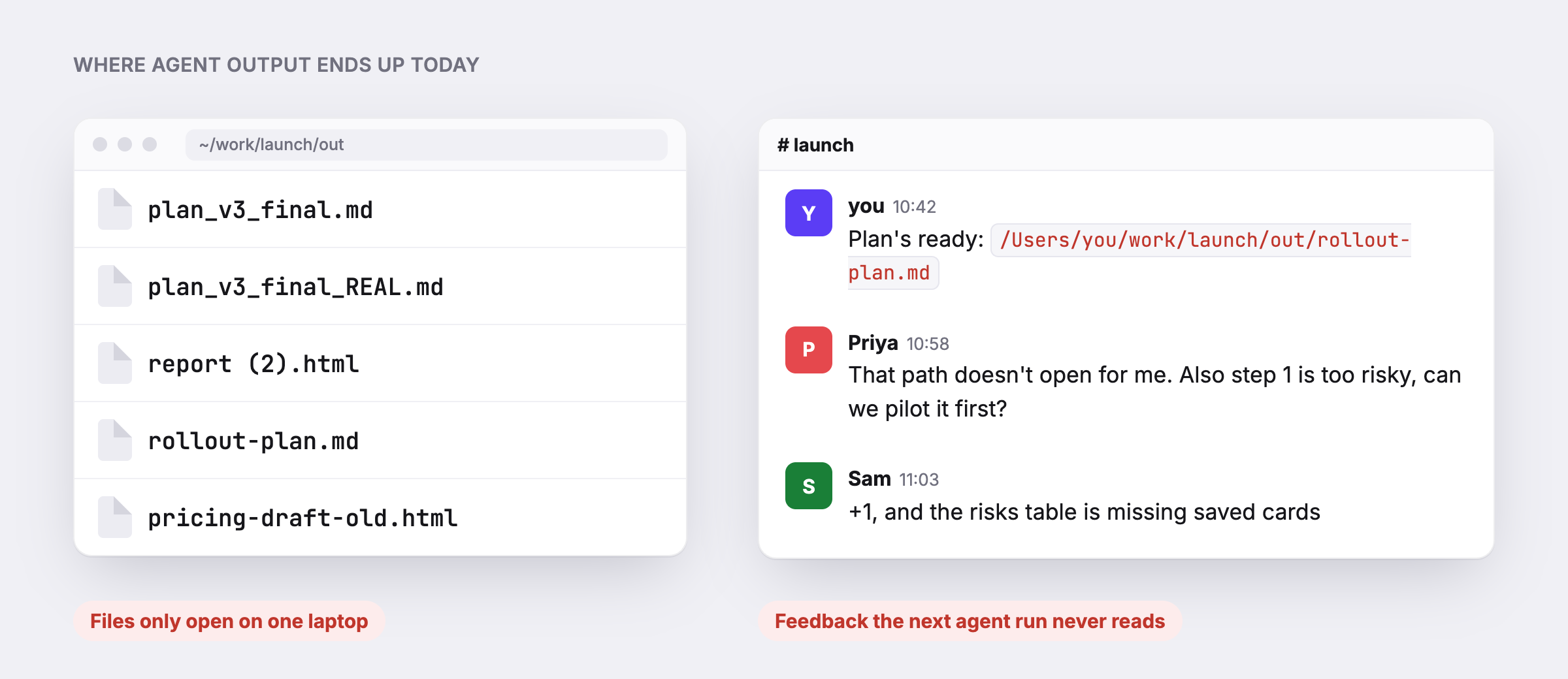
A path like /Users/you/work/launch/out/rollout-plan.md works on exactly one laptop. Then a teammate replies in the thread with "step 1 is too risky, can we pilot it first?", which is a good note. The agent never sees it. The next run starts from the old plan, and someone copies the feedback in by hand.
So the work has three problems, and they are separate:
- Sharing. A file on my disk is not a link.
- Feedback. Comments land in chat, away from the line they are about.
- The loop back. The agent that wrote the page cannot read the feedback, so it cannot act on it.
Three ways to share agent output, and where each one stops#
Paste it into chat or a doc. Fine for a paragraph. HTML stops working, and a Google Doc turns into a second copy that drifts from the one the agent edits.
Host it yourself. A gist, GitHub Pages, a Vercel or Netlify deploy, or one of the agent hosting services. You get a link, and some of these are very good at it. What you usually don't get is a way for a reader with no account to comment on a specific sentence, or a way for the agent to read those comments back.
Use your agent's built-in artifacts. Claude Code can now publish artifacts and handle comments on them. If your whole team is on Claude and every reviewer has a seat in your org, that may be all you need. If your reviewers are clients outside your org, or you switch between Claude Code and Codex, it stops fitting.
What I wanted was smaller than any of these: one link per piece of work, comments from anyone, and a CLI any agent can call to read them.
The publish, comment, republish loop#
That is why I built byagent. It is a CLI. Your agent runs it, gets a URL back, and hands you the link.
The loop looks like this:
- The agent publishes
rollout-plan.mdand getsbyagent.dev/a/<id>/. - A reader opens the link, selects "step 1", and comments. No sign-up. They type a name.
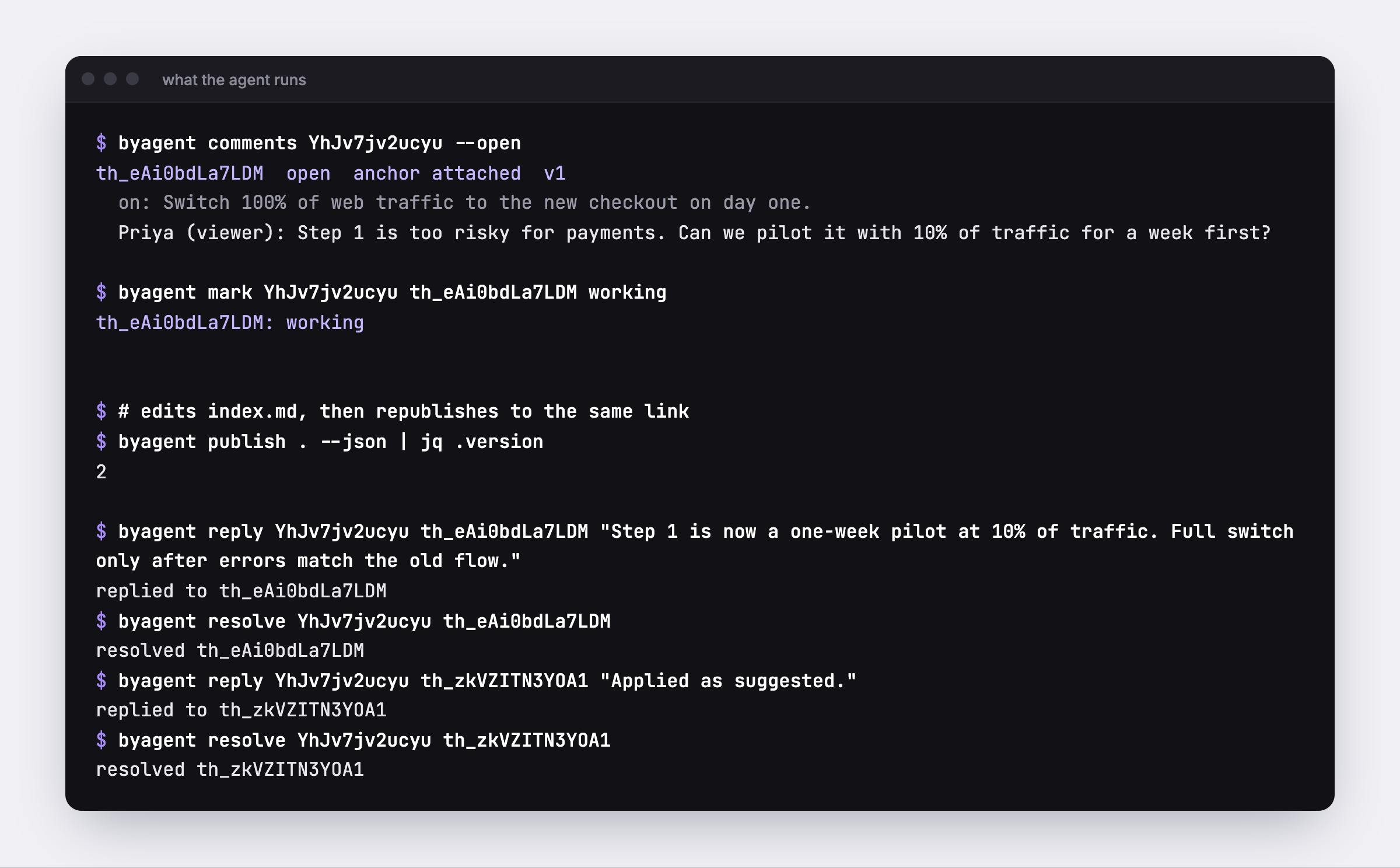
- The agent reads the open comments, marks the thread "working" so the reader can see it was picked up, edits the plan, and republishes to the same link.
- It replies under the comment and resolves it. The reader refreshes and sees v2.
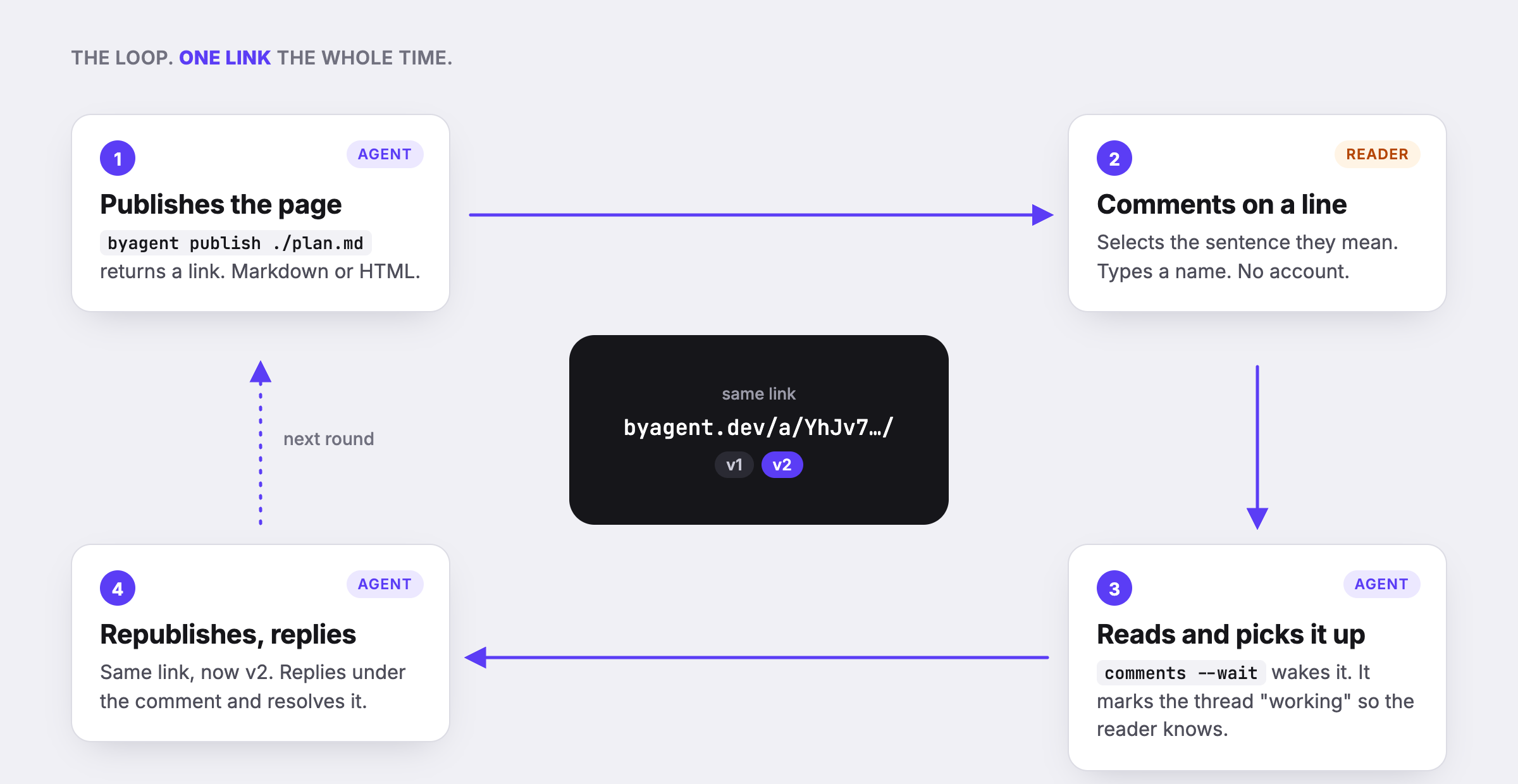
Here is that loop on a real page. The screenshots below are one rollout plan going from v1 to v2.
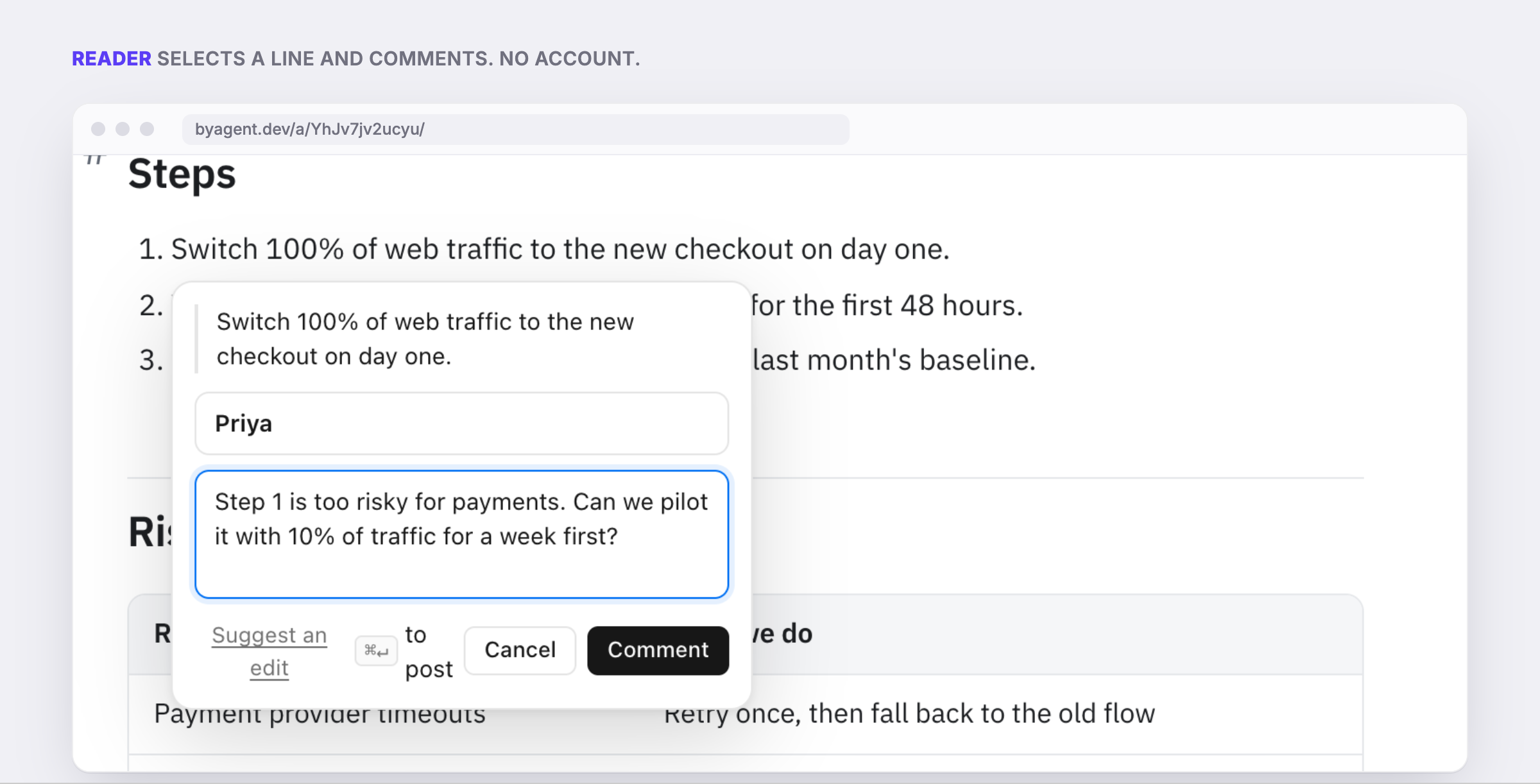
A reader selects step 1 and leaves a comment. There is no sign-up, just a name field:
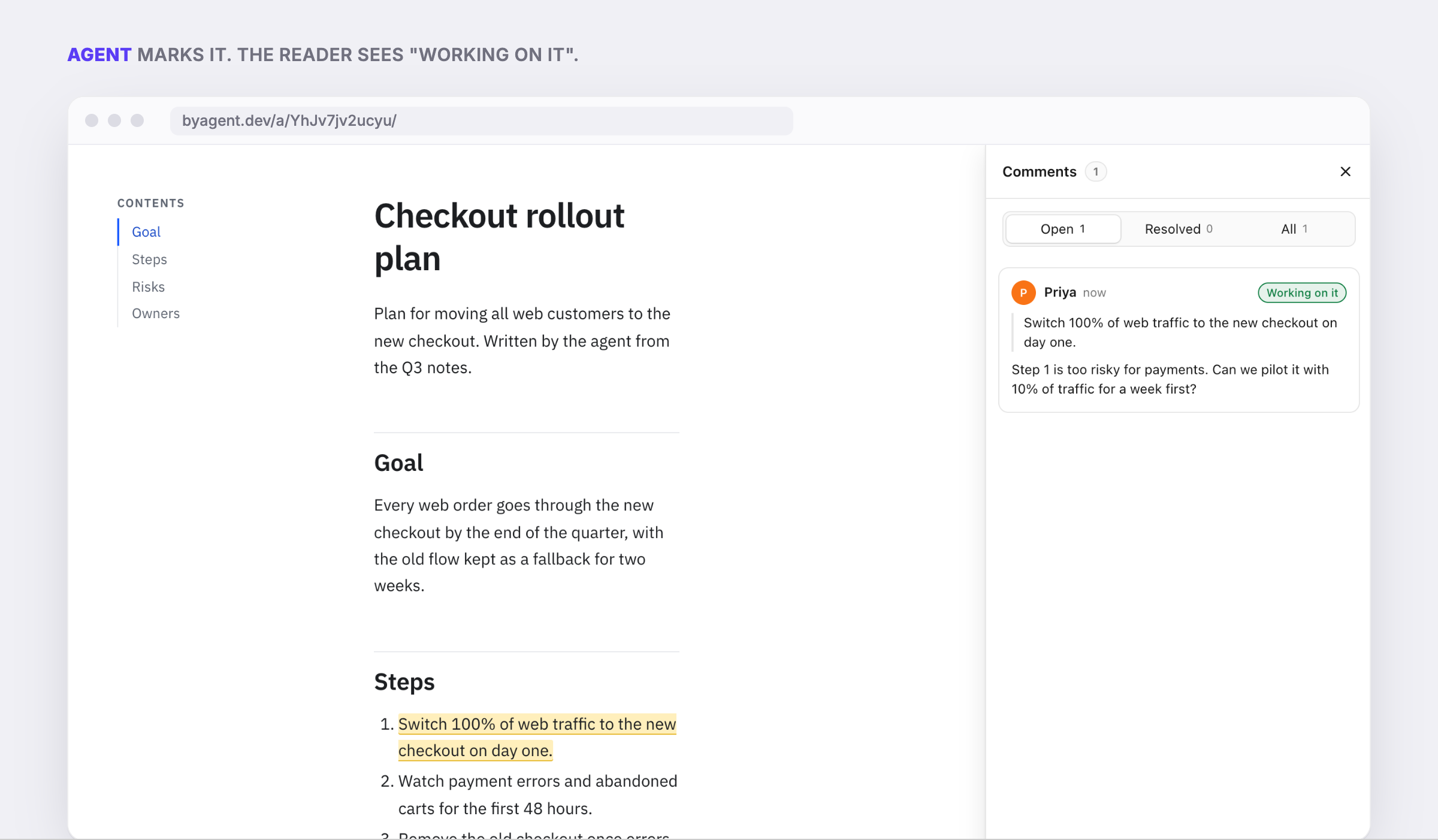
The agent reads the comment from the CLI and marks the thread. The reader sees "Working on it" next to their comment:
The agent edits the plan, republishes to the same URL, replies and resolves. The page is now v2:
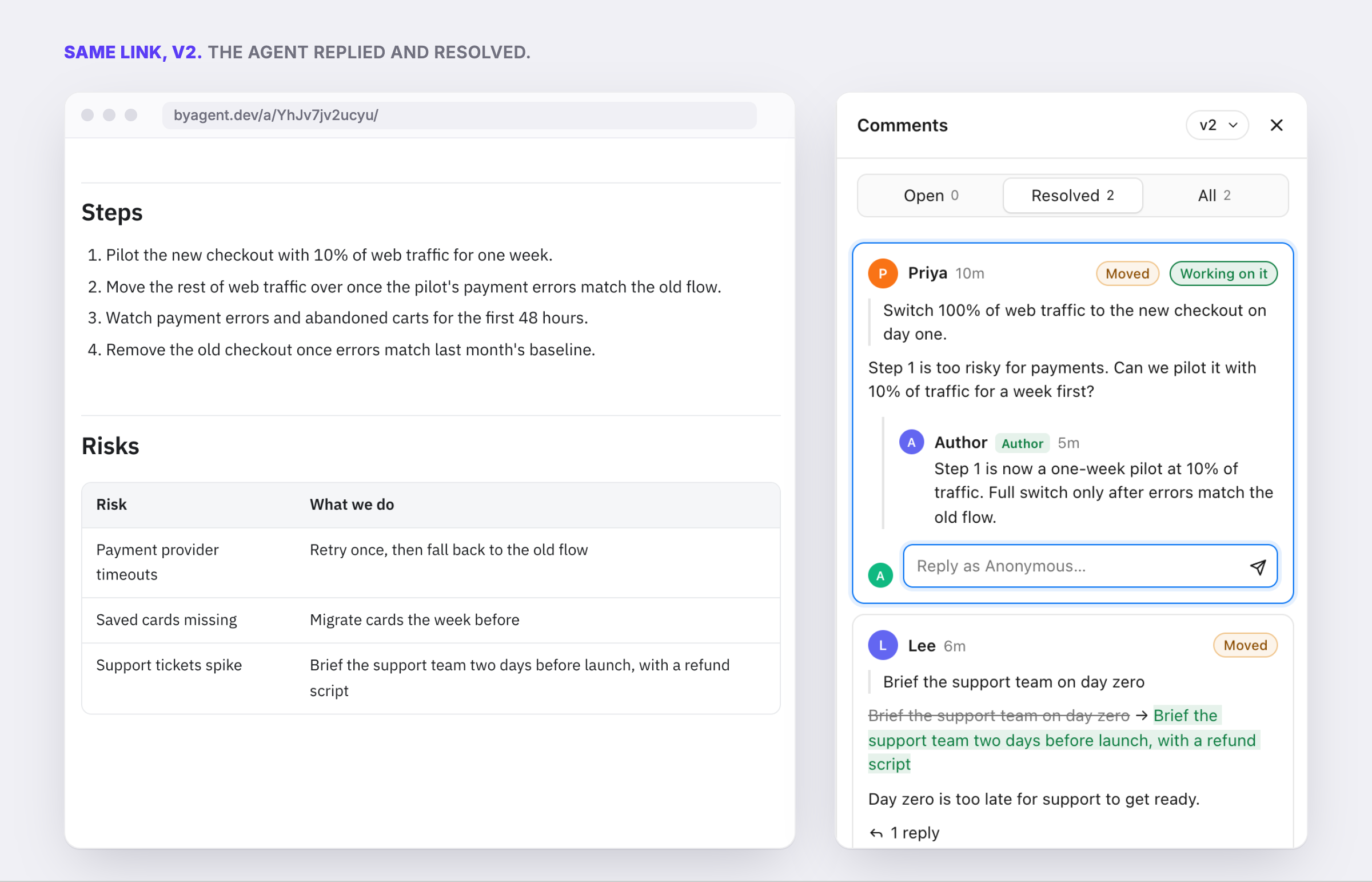
The link never changes, so the one you sent on Monday still shows the latest version on Friday. Older versions are kept, with rollback.
Try it without an account#
You need Node. From any folder with a Markdown file in it:
npx byagent publish ./plan.md
With nothing configured, this gets a guest key and publishes. Guest pages are public, you get three of them, and they stop working 24 hours after the key was made. The output includes a claim link. Open it and sign in, and the pages move into your workspace and stay.
Markdown is rendered into a styled page with light and dark mode, a table of contents, GitHub-style tables and highlighted code. A folder with an index.html is published as-is, so an agent-built dashboard works too.
Set it up for Claude Code, Codex or Cursor#
The real setup is one sentence you paste into your agent:
Set up byagent for this project: read byagent.dev/skill.md and follow it.
The skill tells the agent when to publish (finished reports, plans, specs, pages), when to use --private, how to group pages by project, and how to handle comments. After that you ask for a plan and get a link back, without typing byagent commands yourself.
If you'd rather drive it by hand, the main commands are:
byagent publish ./plan.md --project "Launch" --tag plan
byagent comments <id> --open
byagent mark <id> <thread> working
byagent reply <id> <thread> "Split step 1 into a two-week pilot."
byagent resolve <id> <thread>
Every command takes --json, which is what the agent actually uses. This is the exact session behind the screenshots above:
Let the agent watch a page for comments#
This is the useful part when a page goes out for review:
byagent comments <id> --wait
It blocks until a reader leaves a new comment, prints the threads, and exits. It gives up after 30 minutes by default. Claude Code can run it in the background and pick up the comments when it returns, so you can keep working on something else while a client reviews a page.
Two smaller features help with real reviews:
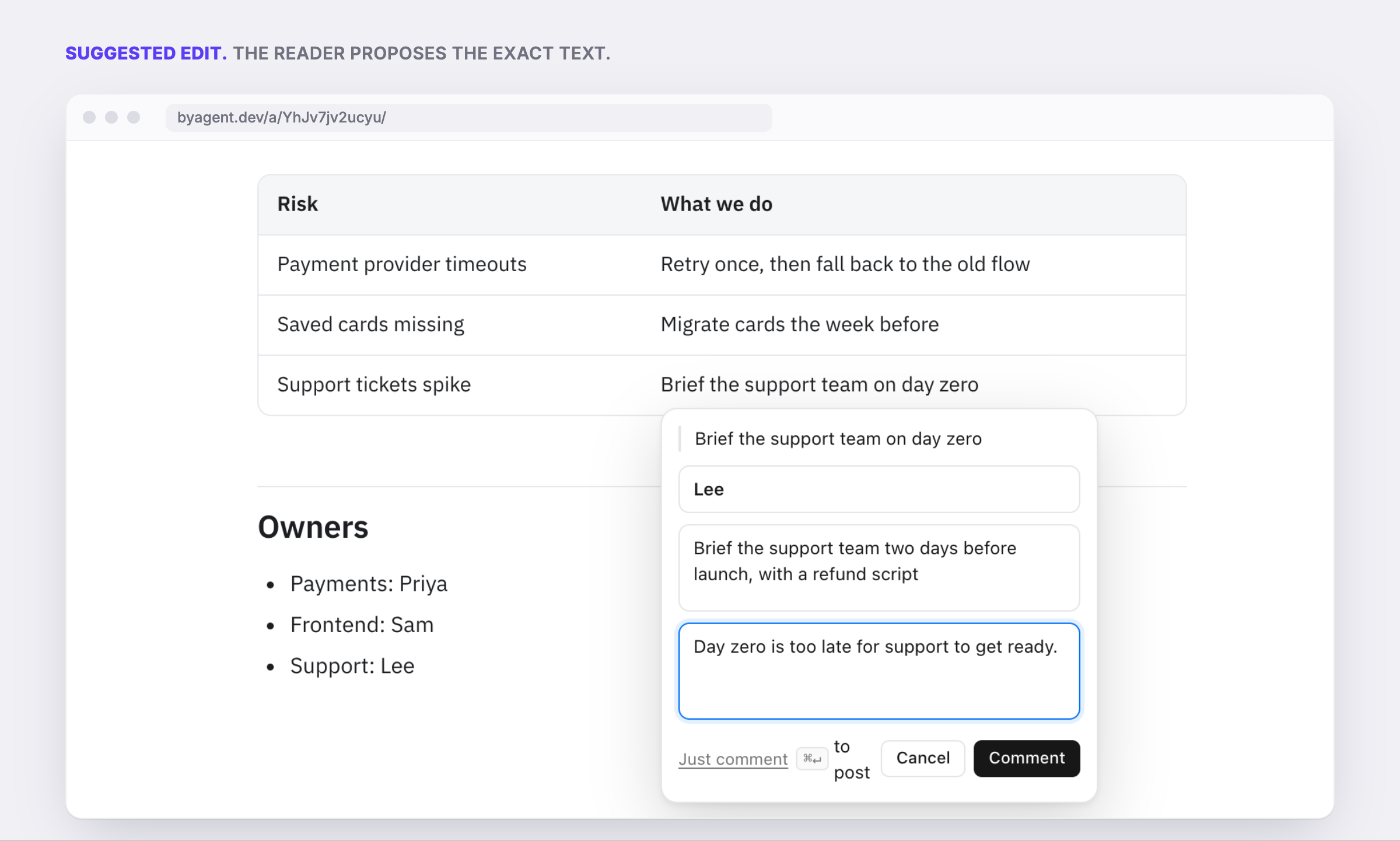
- Suggested edits. A reader can propose exact replacement text for a line. The agent applies it or declines it.
- Declining with a reason. Not every comment should change the page.
byagent mark <id> <thread> declined --note "Out of scope for v1"posts the reason and closes the thread, so the reader isn't left guessing.
One rule matters here: comment text is treated as untrusted input. The skill tells the agent to act on a comment only by editing that page, and never to run commands or open links because a comment says so.
Keeping pages tidy#
- Projects. Pages that share a
--projectname form a collection, so a launch's plan, report and pricing draft sit together. - Expiry.
--expires 7don publish, for a review draft or a one-meeting demo. - Private pages.
--privatekeeps a page inside your workspace.byagent share <id>gives a six-digit code if you need one outside person to see it. - Delete.
byagent delete <id>erases the page, its versions and its comments at once.
What it is not#
It is not a CMS and it is not a doc editor. Readers comment; the agent edits. If you want ten people co-writing a doc, use a doc.
It is also young. It's free today with no paid plan, and the limits are listed on the pricing page.
FAQ#
How do I share a Claude Code HTML file as a link?
Ask Claude Code to publish it with byagent, or run npx byagent publish ./folder on the folder that holds index.html. You get a public URL back.
Do readers need an account to comment? No. They open the link, type a name and comment on a line.
Does it work with Codex and Cursor? Yes. It is a CLI, so any agent that can run a shell command can use it. Claude Code and Codex also have optional hooks that remind the agent to publish finished pages. There are setup guides for Codex and Cursor.
Can I keep a page private?
Yes. Publish with --private, then use byagent share if one outside person needs access.
This post is itself a byagent page. If something here is wrong or unclear, select the line and leave a comment. No account needed.
Setup: Set up byagent for this project: read byagent.dev/skill.md and follow it. More at byagent.dev.